
Dropbox wins for individuals and creative teams who need fast syncing and painless sharing; Box wins for regulated enterprises that need governance, certifications, and admin control. The split comes down to what you're optimizing for: Dropbox's block-level sync and large-file handling suit fast-moving creative work, while Box's compliance stack suits legal, healthcare, and finance teams. Read the breakdown below, then run a short pilot before you commit either way.
TL;DR:
- Dropbox offers faster sync for large files due to block-level updates, making it ideal for creative teams working with video and design files.
- Box provides a broader set of certifications and governance tools, making it better suited for regulated industries like healthcare and finance.
- Small teams and solo creatives should pilot Dropbox first, focusing on file handling and app integrations, before considering migration.
- Enterprises with compliance needs should prioritize Box for its certifications, retention features, and customer-managed encryption keys.
- A 30-day pilot should include real file uploads, testing security controls, and benchmarking sync speeds to accurately evaluate suitability.
Table of Contents
- Dropbox vs Box: A Quick Side-by-Side
- What Separates Dropbox and Box on Security and Sync
- Which Platform Fits Your Team's Actual Job?
- How to Pilot Either Platform Before You Commit
- Why Secure Handling Should Shape How You Evaluate Either Platform
- Sources
Dropbox vs Box: A Quick Side-by-Side
Neither platform wins across the board. Each one is built around a different buyer, and the gap shows up clearly once you line up the decision axes that actually matter during procurement.
- Best for: Dropbox suits solo creatives, agencies, and small teams. Box suits enterprises and regulated industries handling sensitive records.
- Security and compliance: Box carries a wider certification portfolio, including HIPAA, FedRAMP High, and ITAR support, which makes it the default pick for legal, healthcare, and government-adjacent workflows.
- Sync and large files: Dropbox's block-level sync updates only the changed portion of a file, which can speed up work on large video or design files compared to standard full-file syncing.
- Storage and pricing shape: Dropbox plans tend to be more affordable per user and offer generous upload limits, while some Box business tiers include unlimited storage but price around governance features rather than raw space.
- Integrations and ecosystem: Both connect to major productivity suites, but Dropbox leans toward creative and consumer tools while Box leans toward enterprise systems like Salesforce and SAP.
- Admin and governance: Box's admin console offers deeper retention, eDiscovery, and access-control settings designed for compliance teams, not just general IT users.
Global spending on cloud storage is projected to keep climbing through the end of the decade, which is exactly why picking the wrong platform now gets expensive later. Migrating file libraries, retraining staff, and rebuilding sharing permissions costs real time. Getting the axis-by-axis fit right at the start saves that pain.
What Separates Dropbox and Box on Security and Sync
The feature gap between these two platforms isn't cosmetic. It shows up in how each one is engineered.
Security and compliance. Box holds a broader set of enterprise certifications, and tools like Box Shield for threat detection, Box Relay for workflow automation, and Box KeySafe for customer-managed encryption keys exist specifically for legal and compliance teams. Dropbox offers end-to-end encryption options on higher tiers and solid enterprise support, but its governance tooling doesn't go as deep. Both encrypt data at rest and in transit as a baseline, but Box puts more weight on admin-side key management while Dropbox leans on encryption defaults that require less setup.
Sync and performance. Dropbox's block-level sync only pushes the changed pieces of a file rather than re-uploading the whole thing, a real advantage for teams juggling large video or design files. Some Dropbox plans support larger single-file uploads than comparable Box tiers, where upload caps shift depending on the plan.
Storage and pricing. Dropbox is generally the more affordable option for individuals and small teams, with straightforward per-user pricing. Box's business tiers often include unlimited storage, but the pricing logic assumes you need the governance layer that comes with it, not just the space.
Integrations and collaboration. Both platforms connect to hundreds of third-party apps. Dropbox integrates tightly with creative and productivity tools people already use day to day. Box focuses more on enterprise systems, plus native tools like Box Notes for real-time collaborative editing.
Support tiers. Standard plans on both platforms lean on self-service help centers. Enterprise tiers unlock dedicated account managers and faster SLAs, and that's usually the point where it's worth contacting sales directly instead of comparing plan pages.
Pro Tip: Before comparing sticker prices, check whether a plan's "unlimited storage" claim applies per user or is pooled across your whole team. That distinction changes the real cost per seat more than the headline number does.
Which Platform Fits Your Team's Actual Job?
Match the platform to what your team does, not what looks impressive on a features page.
- Solo creatives and freelancers: Dropbox is the natural fit. Pilot it by syncing a folder of large video or photo files and testing your editing app's integration directly against it.
- Small studios and marketing teams: Either platform can work, but the choice usually comes down to which integrations your team already relies on and how fast the team is growing. Pilot cross-platform sharing with an outside collaborator or client before deciding.
- SMBs scaling toward compliance needs: Weigh admin overhead against governance gaps. If you're not yet regulated but expect to be, Box's governance features may be worth the extra setup now.
- Regulated enterprises: Box is the default here, given its certification breadth and tools built for legal and compliance review. Pilot compliance and retention scenarios directly, along with how customer-managed keys work in practice.
The trade-off holds across the board: Dropbox lowers friction and licensing complexity, and Box raises governance capability at a higher administrative cost.
How to Pilot Either Platform Before You Commit
A 30-day pilot beats a six-month regret. Structure it around real use, not a demo account nobody touches.
- Pick a real test group. Choose 10 to 20 users across at least two departments, not just IT.
- Test your actual file sizes. Upload the large media files or dense document sets your team handles weekly, not sample files.
- Verify SSO and SCIM. Confirm single sign-on and automated user provisioning work with your existing identity provider before rolling out further.
- Run a compliance scenario. If retention or eDiscovery matters to your industry, simulate a records request and time how long it takes to fulfill.
- Benchmark sync speed. Time how long large files take to sync and update across a few different network conditions.
When it's time to actually move, keep migration risk low. Use each platform's native export tools first, and consider a third-party migration service if you're moving thousands of files with complex sharing permissions. Preserve version history and existing share links wherever the migration tool allows it, since rebuilding shared links manually is where most teams lose time.
Before calling the pilot done, run three checks: audit permissions to confirm nothing got broader access than intended, confirm retention and eDiscovery settings match your policy, and re-run your sync speed benchmark to compare against your starting numbers.
Pro Tip: Run your compliance scenario test in week one, not week four. If a platform fails an eDiscovery or retention requirement, you want to know before your team has moved half its files over.
Why Secure Handling Should Shape How You Evaluate Either Platform
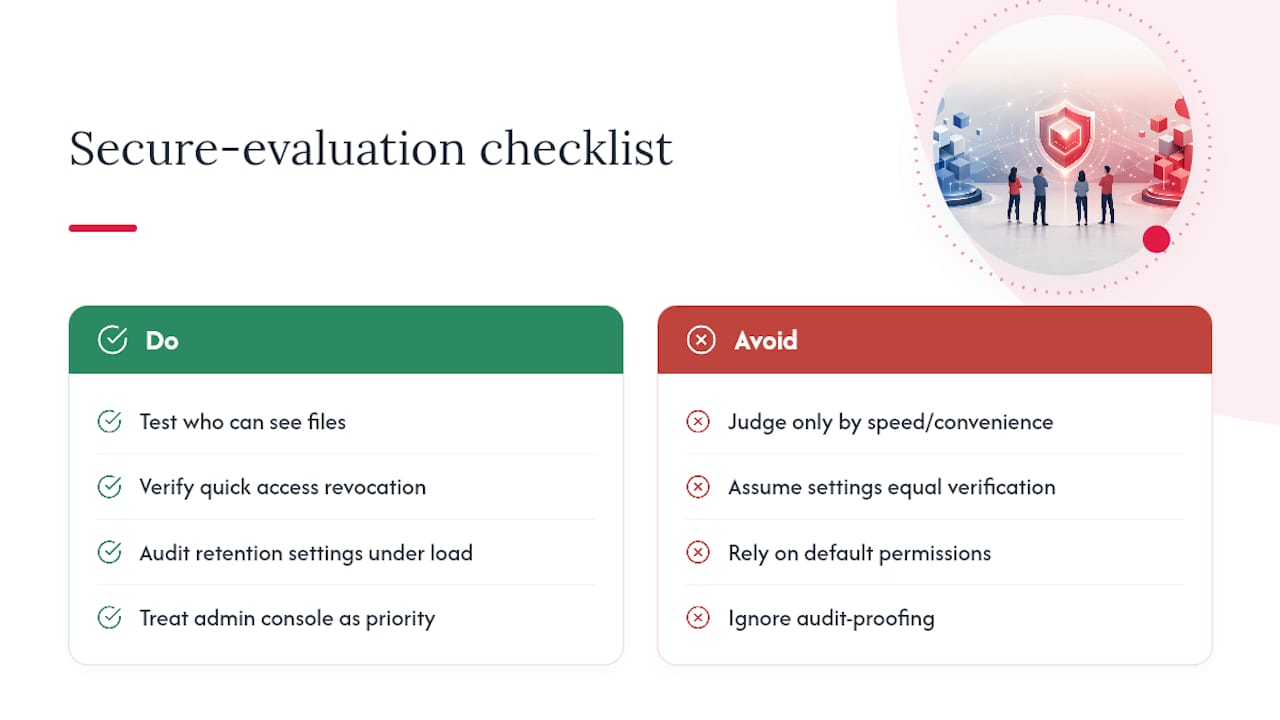
Some companies build their application processes around one constraint: sensitive personal submissions, including government-issued ID, have to stay confidential and only reach authorized reviewers. That experience shapes how we think about any storage platform, not just casting workflows. Governance isn't an abstract checkbox. It's the difference between a file staying private and a file leaking because a permission setting was left too open.
When you pilot Dropbox or Box, don't just test speed and convenience. Test who can actually see a file after it's shared, how quickly you can revoke access, and whether your retention settings hold up under a real audit. Teams handling identity documents, contracts, or any personal data should treat the admin console as seriously as the sync speed. The platform that makes governance easy to verify, not just easy to configure, is the one worth trusting with anything sensitive.
— Trent